Loopixel facts: specs, limits and comparison
One PNG, JPG or WebP in, a transparent looping pixel sprite sheet out in about a minute, for 1 credit.
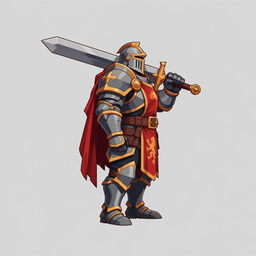
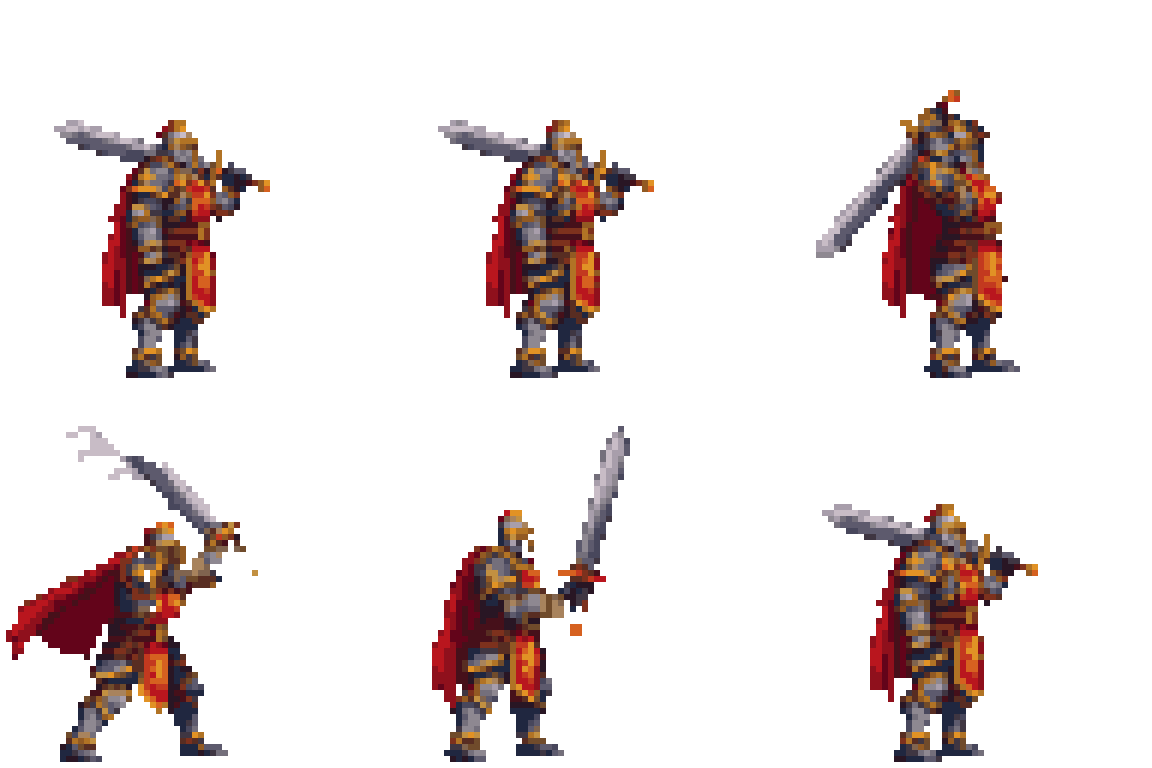
- 5 sizes · 32–128 px
- 8 frames · 10 fps
- ≤ 24 colours
- $2.99 / $9.99 / $24.99 one-time
Specifications
- Input
- PNG, JPG or WebP, up to 8 MB
- Flow
- Upload, then a transparent pixel still in about 12 s (2 free redraws, 3 tries in total), then the looping animation in about 1 min
- Single-direction actions
- Walk, idle, run, attack, fire, jump, item, VFX (spell and effects), or a custom action you describe
- 4-direction mode
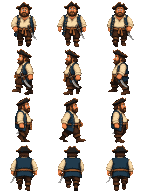
- Walk cycle only. Rows: front, right, back, left
- Frame size
- 32, 48, 64, 96 and 128 px square frames; all five in every ZIP (64 px by default)
- Sheet layout
- Single direction: 1 row × 8 frames. 4 directions: 4 rows × 8 frames
- Palette
- Each frame size gets its own palette of at most 24 colours, built from every frame and every direction at that size, then locked across all of them.
- Transparency and scaling
- Each size is downscaled separately from the animation with area averaging, not upscaled from a smaller size. Alpha is hard: every pixel is fully opaque or fully transparent, with no semi-transparent edge.
- Frame timing
- 10 fps, looping; each frame lasts 100 ms in atlas_{size}.json. Cells have no padding, offset, trimming or rotation, so sheet width = 8 × frame size.
- Files
- Per size: sprite_{size}.png sheet, atlas_{size}.json, frames_{size}/ single-frame PNGs and a transparent looping GIF, all in one ZIP
- Price
- Try 3 credits $2.99, Indie 20 credits $9.99, Studio 60 credits $24.99. One-time, no subscription, credits never expire
- Cost per animation
- 1 credit, in one direction or as a 4-direction walk cycle
- Free preview
- New accounts signing in with Google get 2 free full-loop previews, clearly visible on a checker background with a small Loopixel tag. Email sign-up has none. Transparent PNG, GIF and ZIP downloads need a credit
- Credit timing
- 1 credit is charged when you start a job. It covers the pixel still, up to 2 free redraws of it (3 tries in total) and the animation. A new Google account’s free previews are used the same way.
- Failures and refunds
- If generation fails on our side, the credit (or free preview) is refunded automatically, once. A failed free redraw of the still is not refunded, because you keep the previous still. If you leave and the finished result expires before you come back, it is not refunded. Unused packs can be refunded in full within 14 days (support@loopixel.com).
What comes out
The real 4-direction sheet from the production pipeline, and the files that ship in every ZIP.
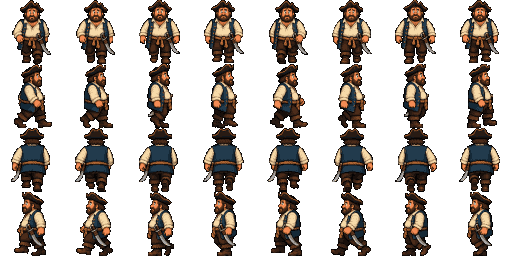
- sprite_{size}.png
- The sheet: 1 row × 8 frames (4 rows for a 4-direction walk), one per frame size
- transparent GIFs
- A looping GIF of the animation at each size (one per direction for a 4-direction walk)
- frames_{size}/
- Every frame as its own transparent PNG
- atlas_{size}.json
- Frame rectangles, 100 ms per frame, for engine importers
Engine import settings
Loopixel frames are fixed squares with no padding, so every engine slices them on a plain grid.
| Engine | Settings |
|---|---|
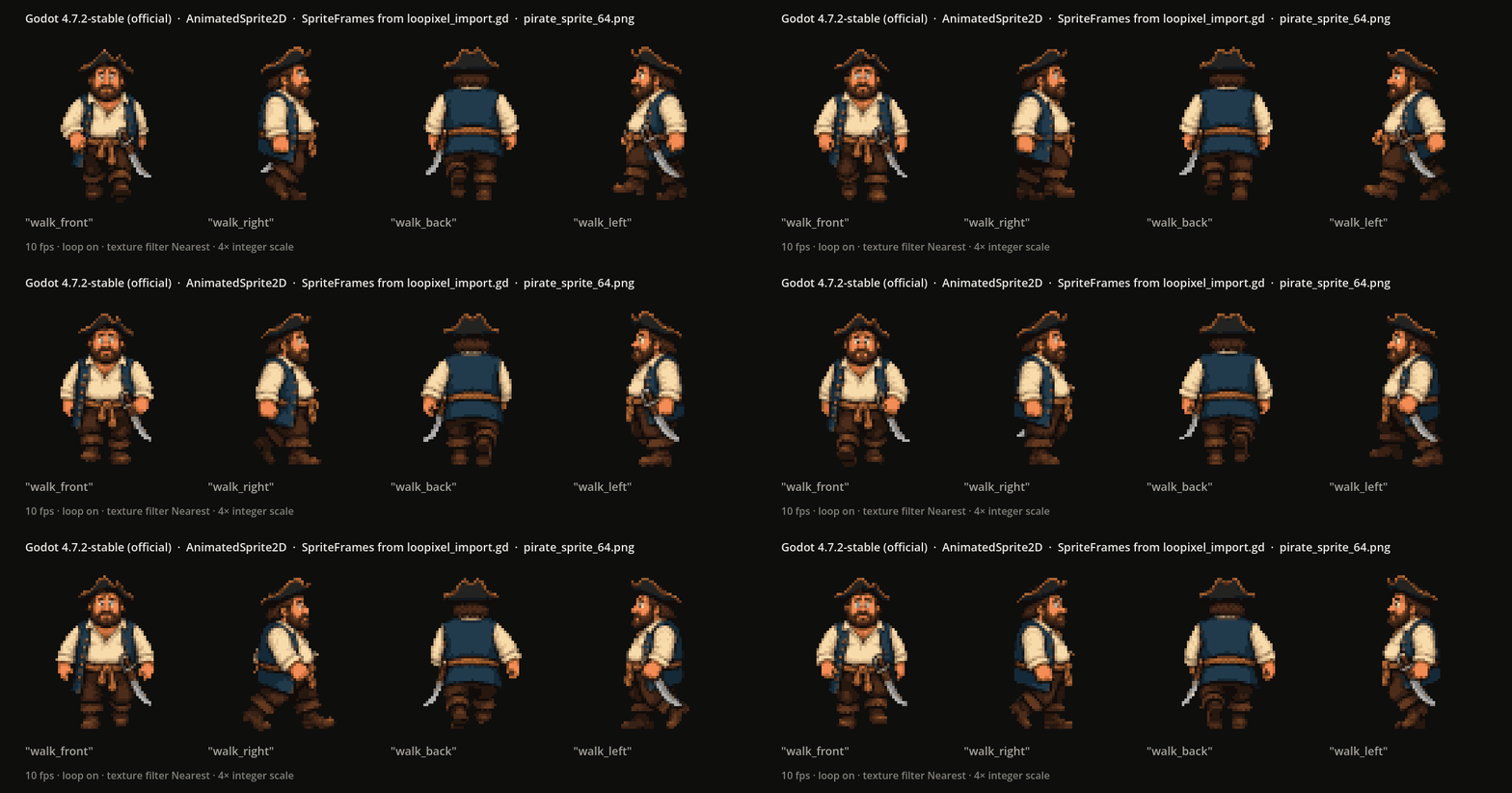
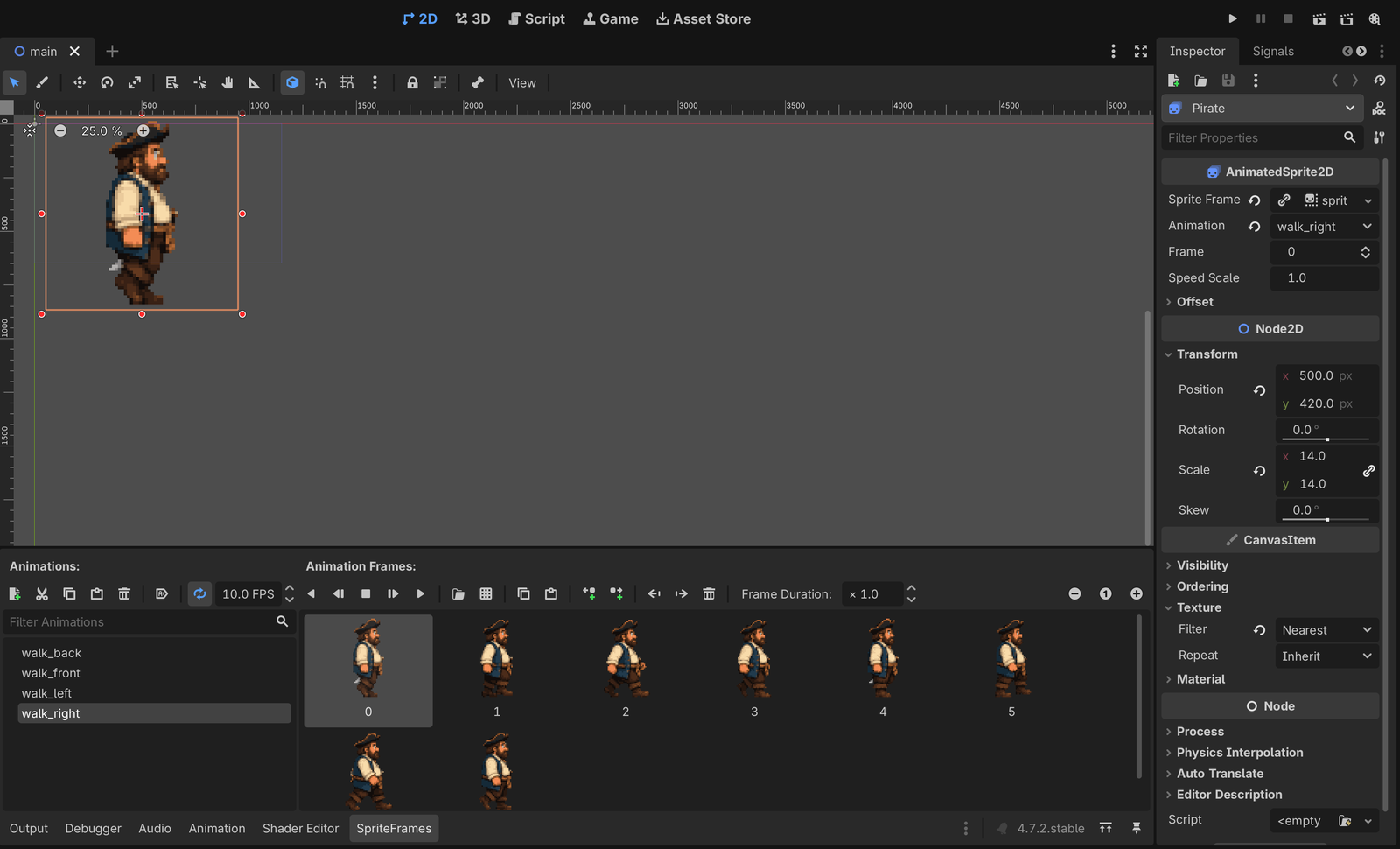
| Godot 4 | Add an AnimatedSprite2D, open its SpriteFrames and choose “Add frames from a Sprite Sheet”. Set horizontal 8 and vertical 1 (single direction) or 4 (4 directions), set Speed (FPS) to 10 with looping on, and use Nearest texture filtering (Project Settings > Rendering > Textures > Canvas Textures > Default Texture Filter). Or run the open-source loopixel_import.gd, which builds walk_front, walk_right, walk_back and walk_left. Godot guide |
| Unity | Set Texture Type to Sprite (2D and UI), Sprite Mode to Multiple, Filter Mode to Point (no filter) and Pixels Per Unit to the frame size, then click Apply. In the Sprite Editor choose Slice > Grid By Cell Size with Pixel Size 64 × 64 (or your frame size), Offset 0 and Padding 0, click Slice and then Apply. Set the clip frame rate to 10. Unity guide |
| Aseprite | File > Import Sprite Sheet, then set the sprite width and height to the frame size (64 × 64 for sprite_64.png) with offset 0, 0 and padding 0. Aseprite guide |
| RPG Maker MV/MZ | Use sprite_48.png with the open-source loopixel_to_rpgmaker.py, which writes a 144 × 192 px, 3 × 4 character sheet. The --frames option picks the 3 frames (default 0,2,4). Or pick 3 frames per row and arrange them by hand, as the RPG Maker guide shows. RPG Maker guide |
Open-source importers
Two small MIT-licensed scripts are public at github.com/zane-labs/loopixel-importers. loopixel_import.gd is a Godot 4 editor script (File > Run): it reads sprite_{size}.png, divides the width by 8 to get the cell size, makes four direction animations from 4 rows or one animation from 1 row at 10 fps looping, and writes res://sprite_frames.tres. It was tested on Godot 4.7.2. loopixel_to_rpgmaker.py (Python with Pillow) turns a 4-direction sheet into a 144 × 192 px RPG Maker sheet, reorders the rows to down, left, right, up, scales other sizes to 48 px with nearest neighbour, and writes the file name you give it (start it with $ so RPG Maker treats it as a single character). They are not plugins and do not run on Loopixel’s site.
What Loopixel can’t do
Worth a look before you upload.
- No skeletal rigging.
- No 3D output.
- No tilesets or map tiles.
- No self-serve API (there is an API waitlist).
- No frame size above 128 px, and no custom sizes: only 32, 48, 64, 96 and 128 px square.
- No 8-direction mode. Only 1 or 4 directions.
- 4 directions means walk cycles only; other actions are single-direction.
- No built-in RPG Maker export on the site: the 3 × 4 character sheet comes from the open-source loopixel_to_rpgmaker.py script, which you run on your own machine.
Comparison with other sprite tools
Only what each tool publishes on its own site. A detail a page does not state is marked “Not listed publicly”, or the cell points you to their page.
| Dimension | Loopixel | PixelLab | Ludo.ai | Scenario | AutoSprite | Retro Diffusion |
|---|---|---|---|---|---|---|
| Positioning | One image to a transparent pixel sprite sheet in five sizes (32 to 128 px), including a 4-direction walk cycle | Pixel art generation with skeleton animation and 4- and 8-direction views | All-in-one game asset suite: sprites from text or your own art, plus 3D, audio, video and tilesets | Generative asset platform with custom-trained style models | Image to animated sprite sheet | Real pixel-art model, available as an Aseprite extension and in the cloud |
| Pricing model | One-time credit packs: $2.99 / $9.99 / $24.99. No subscription. | Free trial; paid monthly subscription plans (current prices on their site) | Subscription: Indie $20, Pro $50, Studio $350 billed monthly, or $15 / $35 / $300 a month billed annually | Subscription: Starter $15/month (1,500 credits a month); annual billing saves 33% | Subscription: free tier with daily credits; Starter $12/month (500 credits a month) | Cloud: pay per image ($0.05 to $0.18), top-ups from $5, no subscription. Aseprite extension: $65 one-time on itch.io |
| Credit validity | Credits never expire | Not listed publicly | Monthly plans refresh credits each month; annual plans grant the year's credits upfront. Usable for 30 days after cancelling (their pricing page) | Credits reset each billing cycle and do not roll over (their pricing page) | Not listed publicly | Cloud balance never expires (their pricing page) |
| 4-direction pricing | 1 credit, the same as a single direction | Billed per generation: animate with text costs 10 generations at 32 to 128 px; 4-direction characters are a separate tool (their docs) | Animate Sprite costs 1.5 to 20 credits; up to 8 directions | See their pricing page | See their pricing page | See their pricing page |
| Workflow | Upload an image, confirm a transparent pixel still (about 12 s, 2 free redraws), then get the loop (about 1 min) | Generate or edit characters, then animate with skeletons or generated frames | Generate or upload a sprite, then animate it with a text prompt, keyframes, a reference video or a preset | Train or pick a style model, then generate assets | Upload an image and generate the animation | Generate pixel art from inside Aseprite or the cloud, then edit by hand |
| Output spec | 32, 48, 64, 96 and 128 px square frames, all five in every ZIP; 8 frames per row; PNG sheet, transparent GIF, frames_{size}/ PNGs, atlas_{size}.json; palette up to 24 colours | Animate with text: 16 frames in a 4×4 grid at 32 or 64 px, 4 frames at 65 to 256 px; reference images up to 256 × 256. Other export formats not listed publicly | Sprites drawn from 32 to 384 px, up to 64 frames per sheet; transparent PNG sheet, GIF, frames, MP4, TexturePacker-format JSON | See their site for current export formats | See their site for current export formats | Pixel art in your chosen palette; edit and export from Aseprite |
| Free trial | New accounts that sign in with Google get 2 free previews of the full loop | “Try for free”, no credit card required; limits not listed publicly | A free trial is listed on the pricing page; limits not listed there | Free tier with 50 free daily credits, no credit card (their pricing page) | Free plan at $0 a month with daily credits, basic animations and PNG + atlas export | $0.50 of free balance when you sign up (their pricing page) |
| Best fit | A few characters for a jam or small project. Limits: 4-direction is walk only; 128 px maximum; no 8 directions, rigging, 3D, tilesets or self-serve API | Animating many characters on a monthly plan, with rigging and 8 directions | Teams that want sprites, other assets and design help in one suite | Teams that want a consistent, custom-trained style | Quick image-to-animation with a free tier to start | Pixel artists who work in Aseprite |
Public pricing pages, checked Nov 2026. Prices and plans change; check each site before you buy.
Checked on 2026-11-27 from PixelLab: pixellab.ai, PixelLab: animate-with-text docs, PixelLab: PixelLab API page, Ludo.ai: ludo.ai/pricing, Scenario: scenario.com/pricing, AutoSprite: autosprite.io/pricing, Retro Diffusion: retrodiffusion.ai/pricing, Retro Diffusion: itch.io extension page. “Not listed publicly” means the page did not state it.
Facts questions
What does Loopixel make?
A transparent, loop-ready pixel sprite sheet from one image: five square frame sizes (32, 48, 64, 96 and 128 px), 8 frames per row, plus a transparent GIF, single-frame PNGs and an atlas JSON for each size, all in one ZIP.
How much does Loopixel cost?
One-time packs: 3 credits for $2.99, 20 for $9.99, 60 for $24.99. 1 credit = 1 animation. There is no subscription and credits never expire.
What can’t Loopixel do?
It does not do skeletal rigging, 3D, tilesets, 8 directions or frame sizes above 128 px, and it has no self-serve API. 4-direction mode makes walk cycles only.
Is there a free trial?
New accounts that sign in with Google get 2 free previews of the full loop, clearly visible with a small Loopixel tag. Email sign-up has no free previews.
When is the credit charged?
When you start a job. That one credit covers the pixel still, up to 2 free redraws of it (3 tries in total) and the animation. A new Google account’s free previews are used the same way.
Are Loopixel sprites nearest-neighbour scaled?
No. Each frame size is downscaled separately from the animation with area averaging, then alpha is made hard (fully opaque or fully transparent) and the colours are locked to a palette of at most 24 colours.
Related tools and guides
- Image to sprite sheet
- 4-direction sprite sheet
- RPG Maker sprite generator
- PixelLab alternative
- Ludo.ai alternative
- No-subscription sprite generator
- Godot sprite sheet
- Unity sprite sheet
- Aseprite sprite sheet
- Pixel art walk cycle
- GameMaker sprite sheet
- Pixel art animation generator
- GIF to sprite sheet converter
- Sprite sheet to GIF converter
- Sprite sheet guides