GIF to Sprite Sheet Converter
Drop a GIF, get a PNG sprite sheet with every frame in a grid. It runs in your browser, so the file is never uploaded.
- Free, no sign-up
- Transparency kept
- GIF up to 10 MB
- Frame data as JSON
How to turn a GIF into a sprite sheet
Five steps, about a minute.
- Drop your GIF on the tool, or click it and choose a file. Up to 10 MB. Nothing is uploaded: it is read in your browser.
- Check the frame count, frame size and average speed above the preview. These come straight from the GIF.
- Pick the layout. Leave Columns empty for one row, or enter a number to wrap the frames into a grid. Add 1 or 2 px of padding if your engine bleeds neighbouring frames.
- If the GIF is an enlarged pixel-art GIF, use Shrink to bring each frame back to its real size.
- Download the PNG sprite sheet. Download the frames JSON too if you want each frame’s position and delay.

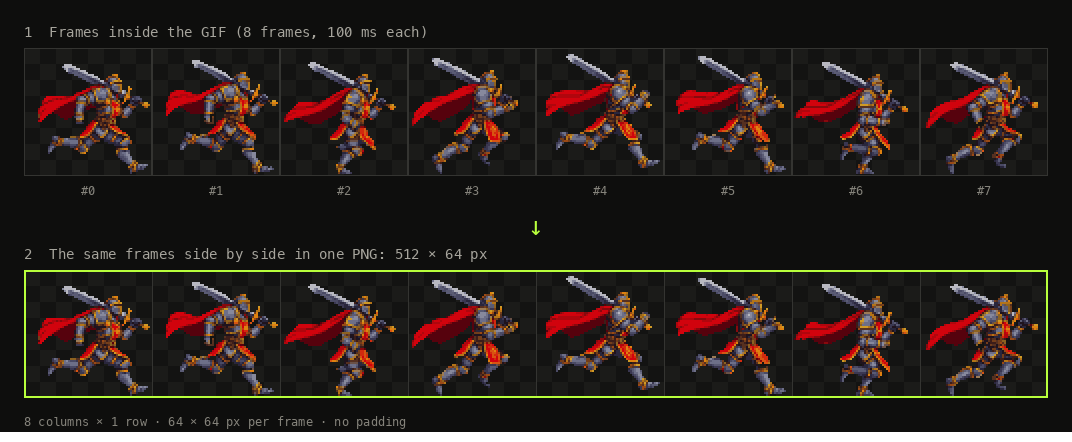
What happens to the frames
The same 8 frames, before and after. Nothing is redrawn: each cell is a copy of the GIF frame.
The options, explained
| Option | What it does |
|---|---|
| Columns (empty) | One row with every frame. Sheet width = frames × frame width |
| Columns (a number) | Wraps into a grid, left to right and top to bottom, in playback order |
| Padding 1 or 2 px | A gap between cells only, not around the edge. Frame positions are written to the JSON |
| Shrink ÷ N | Nearest-neighbour. Use it when the GIF was enlarged N times from a smaller original |
| Full GIF canvas | On: every frame has the GIF’s full size. Off: cropped to the area that moves |
Why a GIF behaves differently from a sheet
- A GIF stores only the pixels that change from one frame to the next. The tool plays those pieces back in order, so every frame in the sheet is the complete picture, as a browser shows it.
- GIF delays are stored in hundredths of a second. A delay of 0 or 1 is shown as 100 ms by browsers, and the tool does the same, so the speed it reports matches what you see.
- GIF transparency is on or off. The PNG keeps those transparent pixels, but a GIF can never give you smooth, semi-transparent edges.
- A GIF holds at most 256 colours. If a GIF was made from a photo or a smooth render, the frames are already dithered and a sheet built from them will be too.
Use the sheet in your engine
A sheet from this tool is a plain grid, so you slice it the same way as any other sprite sheet: frame width, frame height, columns and rows.
Import steps are in the Godot, Unity, GameMaker and Aseprite guides. Going the other way? The sprite sheet to GIF converter turns a sheet back into an animated GIF.
No animation yet?
Start from one image instead of a GIF.
GIF to sprite sheet questions
How do I convert a GIF to a sprite sheet?
Drop the GIF onto the tool above. It reads every frame, shows them with the finished sheet, and lets you choose columns and padding. Then download the PNG. The frames are placed left to right, top to bottom, in playback order.
Is my GIF uploaded anywhere?
No. The GIF is decoded and the sheet is built in your browser. No request sends your file anywhere; you can check this in your browser’s network panel.
Does the sprite sheet keep transparency?
Yes. The PNG keeps every transparent pixel the GIF had. GIF transparency is on or off, so there are no semi-transparent edges. If the GIF has a solid background colour, that colour is part of the image and stays.
Why are my frames so big?
Pixel art GIFs are often enlarged 4x, 6x or more so they look sharp when shared. The tool detects an exact enlargement and offers Shrink, which divides each frame back down with nearest-neighbour sampling.
What about GIFs where every frame has a different delay?
A sprite sheet is a fixed grid, so the sheet itself has no timing. The frames JSON lists the delay of every frame in milliseconds, and the tool shows the average speed in frames per second. Set your engine to that speed.
What are the limits?
The GIF can be up to 10 MB. The finished sheet can be up to 16,384 px on a side. If a sheet is too wide, use more columns or shrink the frames.
Related tools and guides
- Image to sprite sheet
- 4-direction sprite sheet
- RPG Maker sprite generator
- PixelLab alternative
- Ludo.ai alternative
- No-subscription sprite generator
- Facts and comparison
- Godot sprite sheet
- Unity sprite sheet
- Aseprite sprite sheet
- Pixel art walk cycle
- GameMaker sprite sheet
- Pixel art animation generator
- Sprite sheet to GIF converter
- Sprite sheet guides