Pixel Art Idle Animation: Build a Breathing Loop
· 7 min read · Loopixel team
Frames and measurements from a real Loopixel idle sheet; engine calls from the official docs
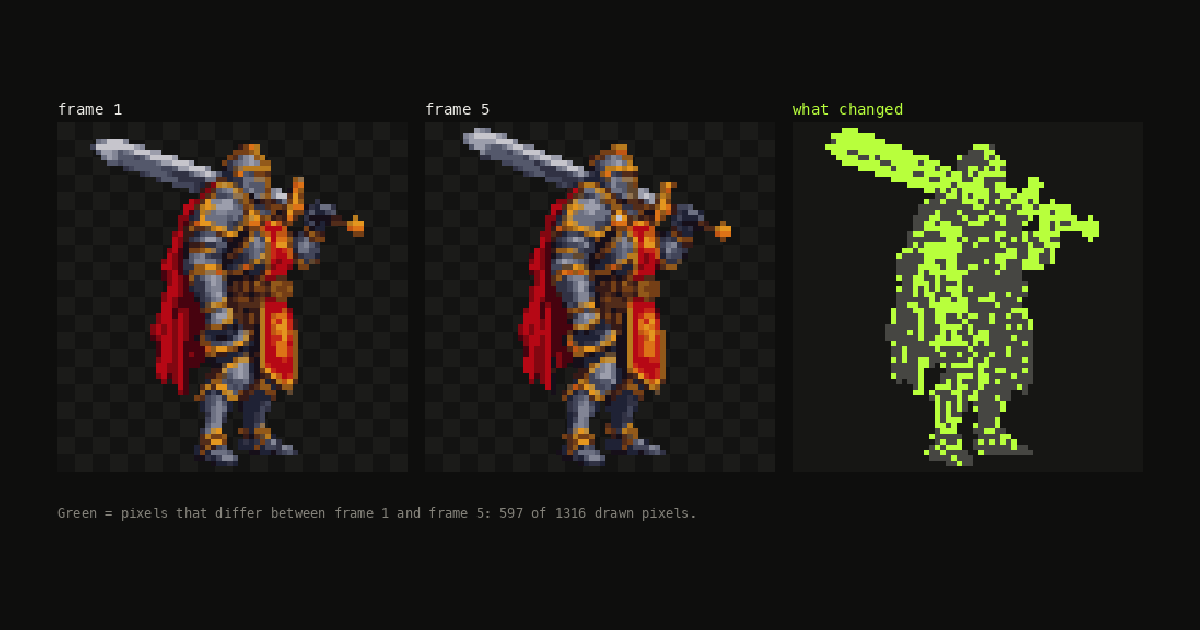
An idle animation plays more than any other animation in your game: every time the player stops to read, wait or think. It should be quiet enough to ignore and alive enough that the character does not look frozen. This guide covers what an idle has to do, how a breathing loop works, how many frames and how much time to give it, what a real 8-frame idle looks like frame by frame, and the mistakes that make an idle look like a bug.
On this page · 7
What an idle is for
Idle tells the player the game is running and the character is theirs. It also sets the baseline every other animation is judged against: a walk or run cycle should start from the same ground line and pivot as the idle. Plan the idle first, then draw the rest to match.
How a breathing loop works
Real breathing moves the chest and shoulders, then the head follows slightly later. In pixel art that becomes a very small number of pixel changes.
- Start with a neutral standing pose with the feet planted. This is frame 1.
- Move the upper body up by 1 px for the inhale and shift the shoulders with it. The head can lag by one frame.
- Return to the neutral pose for the exhale, then, if you want a fourth beat, drop the chest 1 px below neutral.
- Optional: a blink or a cloth or cape sway on a different beat than the breath, so the loop does not feel mechanical.
- Check that the last frame leads into the first without a jump.
Anything that hangs, such as a cape, hair, a scarf or a tail, can lag the body by a frame. It adds life for very few pixels.
Frame count and timing
| Frames | What it gives you | Timing to try |
|---|---|---|
| 2 | Up and down, nothing else. Cheapest, most mechanical | Hold each frame 400–600 ms |
| 4 | Neutral, inhale, hold, exhale. Reads as breathing | 150–300 ms per frame |
| 8 | Smooth, room for a delayed head and a swaying cape | At 10 fps a loop lasts 0.8 s; try 5 to 6 fps for a slower breath |
These timings are starting points, not rules. An idle that you can still notice after a minute of staring is too busy. Slow it down before you add more movement. In an engine you can do that by lowering the frame rate or giving frames longer durations rather than redrawing anything.
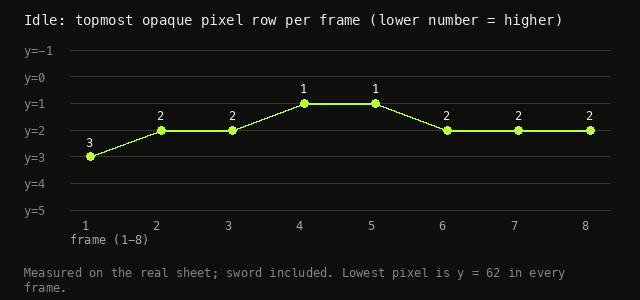
A real 8-frame idle, frame by frame
This is the knight idle from the pixel art animation generator, an actual Loopixel output at 64 px. Because an idle changes so little, the picture below is more useful than a pose list.

At a glance the 8 frames look almost identical. The top of the sprite rises from row 3 in frame 1 to row 1 in frames 4 and 5, then settles at row 2. That is the whole breath: about 2 px, with the feet on the same row in every frame.
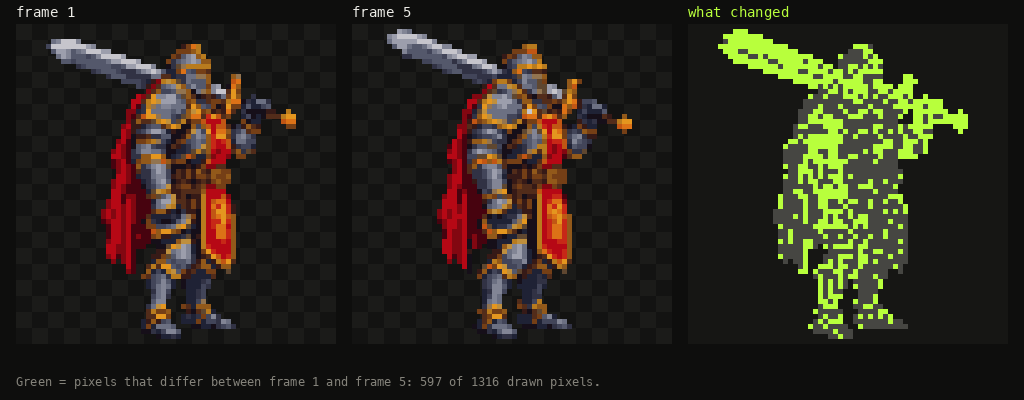
Notice that the difference is not one block moving: the changed pixels are spread over the whole figure, which fits a small body movement redrawn at 64 px rather than a single limb animating. If a frame feels off, open the sheet in Aseprite, use onion skinning to compare neighbours, and fix that frame by hand; the Aseprite guide shows the round trip.
Set it up in the engine
A Loopixel idle is a 1 row × 8 frame sheet. Slice it as shown in the Godot or Unity guide, then slow it down.
Godot 4
- Add the sheet to a
SpriteFramesanimation namedidleon anAnimatedSprite2Dand turn looping on. - Lower
Speed (FPS)for that animation (try 5 to 6). Or keep 10 fps and give some frames a longer relative duration:SpriteFrames.add_frametakes adurationargument, a relative value. - Use
play("idle")when the character has no input, and switch back to walk or run when it moves.
Unity
- Create an
idleclip from the 8 sprites and set its frame rate lower (AnimationClip.frameRate). - Make idle the default state in the Animator controller; add transitions to walk and run.
- To slow the whole animation without editing the clip, change
Animator.speed.
Pivot at the feet keeps the idle, walk and run on the same ground line; the slicing guide shows how to set it.
Common mistakes
- Whole-sprite bobbing. If the feet move, the character floats. Keep the lowest row fixed, as the real sheet above does.
- Too big. More than about 2 px of body movement on a 64 px sprite starts to read as a bounce rather than a breath.
- Too fast. A 0.8 s loop is a brisk breath. Slow it with fps or frame durations before changing the art.
- Loop pop. The last frame does not lead into the first. Play the loop for a minute and watch the seam.
- Everything moves at once. Offset the cape, hair or head by a frame so the parts do not all peak together.
Quick answers
Can I use ping-pong instead of drawing 8 frames?
Yes. Draw the inhale half and play it forward then backward: 4 frames played as 1, 2, 3, 4, 3, 2 gives a smooth breath. Aseprite tags have a Ping-pong animation direction, and engines have equivalent loop modes. Check that the turnaround frames do not stay on screen twice in a row.
Does a top-down idle work the same way?
The principle is the same: a very small movement of the upper body and anything that hangs. Loopixel idles are single-direction; for several facings you would need one idle per direction, and 4-direction mode makes a walk cycle only. See the 4-direction sprite sheet page.
I have an idle as a GIF. How do I get a sheet?
Use the GIF to sprite sheet tool, and sprite sheet to GIF for the way back, for example for a devlog post.
Sources
Engine menu paths and property names above were checked against the official documentation:
- Godot: SpriteFrames
- Godot: AnimatedSprite2D
- Unity: AnimationClip.frameRate
- Unity: Animator.speed
- Aseprite: Tags (animation direction)
- Aseprite: Timeline (onion skinning)
Try it with one image
Upload one image and get an 8-frame pixel sprite sheet in about a minute. 1 credit per animation, credit packs from $2.99, paid once.
Create a sprite sheet